
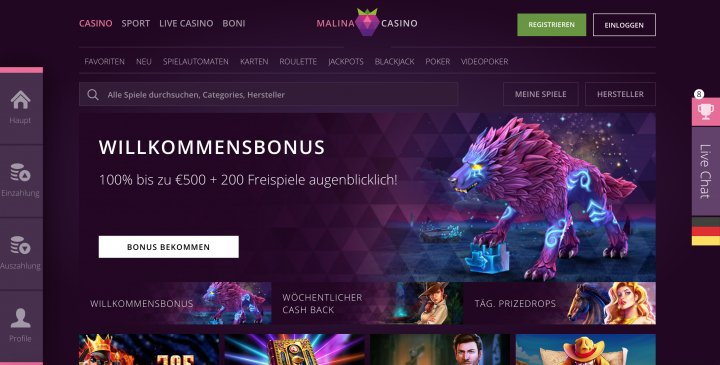
For anyone who loves online casinos, the ideal is taking your top games with you. That’s just what the Malina Casino mobile app offers. It turns your phone or tablet into a real little casino, loaded and ready to go. You could be on the bus, taking a break at home, or waiting before a meeting. The app places a high-quality selection of games, reliable banking, and attractive bonuses straight in your hand. The convenience is difficult to match, and the whole thing is crafted for mobile from the ground up. Gameplay is smooth, and getting around feels intuitive. Here’s a thorough look at installing and using the Malina Casino app for players in Canada.
Exclusive Bonuses for Mobile App Users
I always verify if a casino provides mobile players additional perks. Malina Casino provides some great reasons to utilize the app. At times casinos run special promotions or improved bonuses for people who deposit or play through their app. You might encounter packages of free spins, reload bonuses exclusively for the app, or even a separate welcome bonus tier. Be sure you check in the “Promotions” section inside the app itself, because these deals aren’t necessarily displayed on the main website. Activating push notifications is a smart move to catch these limited-time offers. Gaming on the app can occasionally gain you more loyalty points too, which boosts your overall rewards. Like always, review the terms and conditions for any bonus you claim.
Tips for Ideal Mobile Gaming Experience
You can enhance your Malina Casino app gameplay even better with a bit of prep. From what I’ve observed, these helpful tips help a lot:
- Consistent Connection:
- Device Maintenance:
- Power and Storage:
- Controlled Gaming Tools:
- Try Demo Mode:
Entertainment and Features Accessible on the App
Any casino app lives or dies by its games. Malina’s app performs very well. I noticed the library to be extensive and comprehensive, matching what you find on a desktop computer. You get immediate access to a huge range of slots, from simple classics to the newest video slots loaded with bonus rounds. If you favor table games, there are many options for blackjack, roulette, and baccarat. The live casino section really shines on mobile, with crisp streams from professional studios providing the real casino vibe to your screen. The app also includes all the important features: a fully working cashier for deposits and withdrawals, access to your bonus wallet, a detailed game history, and round-the-clock customer support. It’s all arranged in a neat, simple menu.
Security and Fairness on Mobile
Maintaining security is my primary focus on any platform, and I was pleased with the measures on the Malina app. The app uses the same robust SSL encryption as the desktop site, which protects your personal and financial details during transmission. Malina Casino holds a licence from a trusted authority. That licence mandates regular checks by independent agencies to ensure the games are fair. The Random Number Generators (RNGs) behind the slots and table games are verified for true randomness. On your end, I’d advise using a trusted private network (avoid public Wi-Fi for money moves) and setting up two-factor authentication if the app supports it. The casino does its part, and with smart habits from you, the environment remains safe.
Why Choose the Malina Casino Mobile App?
You can easily use your phone’s browser, so why bother with an app? In my book, a dedicated app like Malina’s simply functions better. It’s built for performance, so games load faster, slot animations run smoother, and live dealer streams stay steady. You also get handy features like push alerts for new games or special promotions, which you’d most likely miss otherwise. On the security side, the app creates a direct, encrypted link. And because the interface is tailored for touchscreens, browsing hundreds of games, managing your account, and handling money is just a tap away. It comes across as a polished product designed specifically for fun.
Common Questions
Is downloading the Malina Casino app free?
Yes, it is entirely free. Downloading and installing the Malina Casino app on your Android or iOS device costs nothing. The casino doesn’t charge for the app itself. You only put in real money when you choose to play for real cash. Even then, you can typically try most games in free demo mode to practice or simply enjoy yourself.
Is my current desktop account usable on the app?
Absolutely, you can and it is recommended. Your Malina Casino account functions across all platforms. The same username and password work for the app, desktop site, and mobile browser. All data remains synchronized, so your balance, bonus status, and game history https://www.reddit.com/r/LivestreamFail/ are identical across all platforms.
Are all games offered on the mobile app?
Almost all games are present. The developers make sure each game works on mobile, so you’ll find slots, table games, and live dealer titles. Occasionally, a brand-new game may launch on desktop first, but it is added to the app shortly afterward. The selection is very thorough.
What is the process for deposits and withdrawals on the app?

It’s the identical process as on the website, and just as secure https://malinagreece.org/en-ca/. Open the cashier or banking area inside the app. Pick your selected payment way from the list (like credit cards, e-wallets, or Interac), enter in the amount, and complete the prompts. Withdrawals begin the same way, with funds sent back to your chosen method after the usual verification steps.
How should I proceed if the app crashes or has issues?
Commence with the basics: force-close the app and restart it, verify your internet connection, and make sure your device’s software is up to date. If the issue persists, uninstall the app and then reinstall it from the official website. For problems that won’t go away, get in touch with Malina Casino’s customer support directly through the live chat or email in the app or on the site. They often respond quickly.
Is it safe to enter my banking details on the mobile app?
It is secure. The Malina Casino app uses industry-standard 128-bit or higher SSL encryption. This creates a secure tunnel for all data moving between your device and their servers. It’s the same level of protection major banks use. Just always double-check you’ve downloaded the official app from Malina’s own website.
Can I get customer support through the app?
You definitely can. Full customer support is built right into the mobile app. You can usually launch a 24/7 live chat with a single click, send an email via a contact form, or browse a detailed FAQ section. The support team can handle questions about the app, your account, or any game issues you encounter.
After testing it, I found the Malina Casino app to be a solid, easy-to-use gateway to great online gaming for Canadians. It succeeds in squeeze the full casino experience onto your mobile screen without compromising. You get a vast range of games, strong security, and some excellent perks for using the app. The best part is having a premium casino in your pocket, ready whenever you are. Follow the download steps, use the tips here, and you’re set for a smooth and entertaining time. If you want versatile, high-quality gaming on the go, the Malina Casino app is well worth a shot.
Step-by-Step Guide to Downloading the App
Putting the Malina Casino app on your device is straightforward. I’ll walk you through the basic steps to get you set up without a hitch. Note, you won’t find it on the Apple App Store or Google Play Store because of their regulations on real-money gambling. Alternatively, you download it straight from the Malina Casino website. This is standard and fully secure for licensed casinos. Below is the trusted method:
- Start the web browser on your phone or tablet and go to the official Malina Casino site.
- Search for a link or section called “Mobile” or “Download App.” It’s typically at the bottom of the main page.
- If you’re on Android: Select the download link for the APK file. You may need to temporarily allow installations from “Unknown Sources” in your device settings.
- If you’re on iOS: The process typically involves a configuration profile. Just follow the instructions Malina gives on screen.
- Once the download ends, open the file to start installing.
- Follow any prompts that pop up on your screen during installation.
- Start the app, sign in with your regular account details, or create a new account right inside the app.